


Atari ST1040 SidecarTridge
20 May 2025
Olivetti PC1 black screen
7 July 2025We are witnessing a radical change in the way we create content: music, images, text and even code. Today, thanks to Artificial Intelligence, we can achieve things that once required specific skills, time or financial resources that were often out of reach.
With ever more advanced and accessible tools, it’s possible to write code without being a programmer, compose music without being able to play an instrument, or generate images without knowing how to draw or owning professional equipment.
In this article we won’t focus on ethical questions or on the impact this technology may have on traditional jobs. History teaches us that technological progress is continuous, and every innovation brings new possibilities and new challenges. Our aim here is to show what can actually be done today – and how simple it has become to turn an idea into a small working game, even starting from scratch.
Creating a Game with Artificial Intelligence: From Idea to Reality
In recent years, Artificial Intelligence (AI) has revolutionised many sectors, and video game development is no exception. Today it’s possible to make a game – even starting from scratch – with the help of AI, which can support or even drive the various stages of planning, writing, programming and design.
Whether it’s a simple web game (such as a Tetris or Snake clone) or a more ambitious project (an interactive adventure, a 3D game or a strategy game), AI technologies offer powerful and accessible tools. Let’s see how it works, what can be made and how much “human work” is still needed.
What AI can do when creating a game
Artificial intelligence can step in at almost every stage of development:
🎨 Design and Concept
-
Idea generation: Chatbots such as ChatGPT can help develop plots, game mechanics and consistent lore.
-
Character creation: Generative AIs can draw concept art or 3D models from simple descriptions.
💻 Code and development
-
Writing the code: AI models can generate code for HTML5, Unity, Godot and other engine games, drastically reducing the time needed to prototype.
-
Debugging and optimisation: AI can also help track down bugs or suggest improvements to existing code.
🎵 Audio and Music
-
There are AIs specialised in generating dynamic soundtracks or sound effects that match the game’s atmosphere.
🧠 Smart gameplay
-
AI algorithms can also be used inside the game: to create enemies with realistic behaviour, generate procedural levels, or adjust the difficulty dynamically.
Why use AI to create a game
✅ Time saving: AI automates repetitive or technical tasks, letting you focus on the creative side.
✅ Accessibility: Even people who aren’t experienced developers can make working prototypes.
✅ Creative inspiration: AI can unlock new ideas and solutions to game design problems.
✅ Rapid prototyping: In just a few hours you can have a playable game, even starting from scratch.
Of course, this doesn’t mean the game you create will be perfect and won’t need any work: today there are several AIs, and each one is more specialised in one thing rather than another. Asking the same thing of different models, we’ll get different answers and different interpretations. Some polish the code better, others are more specialised in particular programming languages.. In short, it’s up to us to work out what suits us and not expect everything handed to us on a plate! Although I must say that for some things we manage to get a good 90% ready.
What the user still has to do
Despite the power of AI tools, human input remains essential:
-
🎯 Design choices: AI can make suggestions, but the final word on aesthetics, user experience and consistency belongs to the creator.
-
🛠️ Refining: AI-generated prototypes often need polishing, testing and manual optimisation.
-
🎮 Customisation: To get an original and unique game, you almost always need to customise scripts, graphics and content.
-
👀 Critical supervision: AI can make mistakes or produce suboptimal code. A human eye is needed to guarantee the final quality.
A simple example: cloning Snake in HTML5 with AI
Here’s what AI can do:
Ask for the game’s base code → ChatGPT or another AI can generate it in a few seconds.
- Add features (score, levels, custom skins) → just describe what you want to add.
- Test and modify → the user tries the game in the browser and fixes any bugs or improves the interface.
With a bit of practice, you can have a complete game in a day!
To make the idea even more concrete, here are some examples of games (or components) made or prototyped with the help of AI tools:
🎮 Flappy Bird clone in HTML/CSS/JavaScript generated by ChatGPT in less than 5 minutes, fully working in the browser.
🧩 Procedurally generated levels for a platformer in Unity, with the logic written using GitHub Copilot.
📜 Interactive fiction in “gamebook” style created with AI, where the text, the story branches and even the background music were suggested automatically.
👾 Space Invaders-style game, with basic graphics and audio, generated with scripts suggested and modified via AI.
These games were then improved by hand, but the playable prototype was ready straight away.
Practical example: simplified Snake in HTML5 with AI
Here’s a code snippet for a simple Snake generated by ChatGPT, commented so you can see where and how to make changes:
<!DOCTYPE html>
<html>
<head>
  <title>Snake Game</title>
  <style>
    canvas { background: #000; display: block; margin: auto; }
  </style>
</head>
<body>
<canvas id="game" width="400" height="400"></canvas>

<script>
  const canvas = document.getElementById("game");
  const ctx = canvas.getContext("2d");

  let snake = [{x: 10, y: 10}];  // Posizione iniziale del serpente
  let dx = 1, dy = 0;            // Direzione iniziale (destra)
  let food = {x: 15, y: 15};     // Posizione iniziale del cibo
  const gridSize = 20;

  document.addEventListener("keydown", e => {
    // Cambia direzione con le frecce
    if (e.key === "ArrowUp")    [dx, dy] = [0, -1];
    else if (e.key === "ArrowDown") [dx, dy] = [0, 1];
    else if (e.key === "ArrowLeft") [dx, dy] = [-1, 0];
    else if (e.key === "ArrowRight") [dx, dy] = [1, 0];
  });

  function gameLoop() {
    const head = {x: snake[0].x + dx, y: snake[0].y + dy};
    snake.unshift(head);

    // Controlla se mangia il cibo
    if (head.x === food.x && head.y === food.y) {
      food = {
        x: Math.floor(Math.random() * canvas.width / gridSize),
        y: Math.floor(Math.random() * canvas.height / gridSize)
      };
    } else {
      snake.pop();  // Rimuove la coda se non mangia
    }

    // Collisioni con bordo
    if (head.x < 0 || head.y < 0 || head.x >= canvas.width / gridSize || head.y >= canvas.height / gridSize) {
      alert("Game Over");
      snake = [{x: 10, y: 10}]; dx = 1; dy = 0;
    }

    // Disegna
    ctx.fillStyle = "#000";
    ctx.fillRect(0, 0, canvas.width, canvas.height);

    ctx.fillStyle = "lime";
    snake.forEach(part => ctx.fillRect(part.x * gridSize, part.y * gridSize, gridSize, gridSize));

    ctx.fillStyle = "red";
    ctx.fillRect(food.x * gridSize, food.y * gridSize, gridSize, gridSize);
  }

  setInterval(gameLoop, 100);  // Loop di gioco ogni 100 ms
</script>
</body>
</html>
Practical example of the game created in a few seconds.
It lacks collision with the tail and a check to start the game again after game over
There’s no score, but these are all things that can be polished later.
The game structure is already there, what do you think?
I had to remove the game-over message because it would have appeared constantly when nobody is playing, and set a lower speed so as not to slow the page down too much.
If we know even a little about tinkering with the code, which is commented by the way, the game is done!
Artificial intelligence is breaking down the barriers to entry into video game development. Whether you want to make a simple game for your portfolio or start an ambitious project, today you have powerful allies at your side.
The important thing is to remember: AI is a tool, but you’re the one giving it direction.
You can find another example on the ARCADE page of the site: I wanted to recreate an arcade game I had seen and played as a child, a simple ship dropping bombs into the water to destroy submarines.
The original game was called Depthcharge, produced by Gremlin in 1977. I played it for the first time at a zoo park nearby, when my parents took me there.
Thinking back, I believe it was the first video game I ever played. I clearly remember the feeling of disappointment: I discovered it was a timed game, and that left me unsatisfied.
Today, with a little help, I made my own version inspired by that title. It keeps the original atmosphere but offers different mechanics, based more on skill than on time.
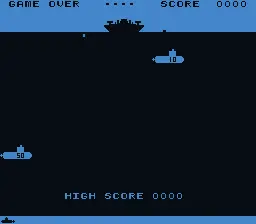
It isn’t hard to replicate a game like this, but so as not to waste a lot of time sorting out the graphics, the CSS, creating the logic.. I made use of a little help, and with a basic structure it was very quick and easy to recreate this game, an hour or a little more.
The initial version is below, very rough, and the torpedoes went all the way to the top of the screen; after fixing the code and adding the graphics the result is much nicer.


You’re probably wondering.. but which AI did you use?
Well, this time I wanted to try Google Gemini, version 2.5 Pro (without a subscription).
The result is excellent; I tried the same prompt with ChatGPT and Claude..
Want to know the results?
Claude created working code but very rough and with logic errors: there are no submarines, torpedoes are fired at random and travel diagonally towards the ship.. well, a right mess, oh and the ship was floating a few pixels above the water. I didn’t insist or have anything corrected.
ChatGPT was very kind to offer a download of the complete zip file with all the code and assets. Shame that nothing works, blank page; it generated WAVs for the sounds but they can’t even be opened with an audio player, and in the zip file it had forgotten to include the .js containing the game logic (minimal, because it has the bad habit of doing 1/3 of what you asked and then asking whether you want to add more)
All this without a subscription; paying surely gives you access to new, more precise features and requests can be longer, whereas here the conversation soon ends, telling you to pay or wait 12 to 24 hours.
