
Repairing a Commodore 64 with case mounts
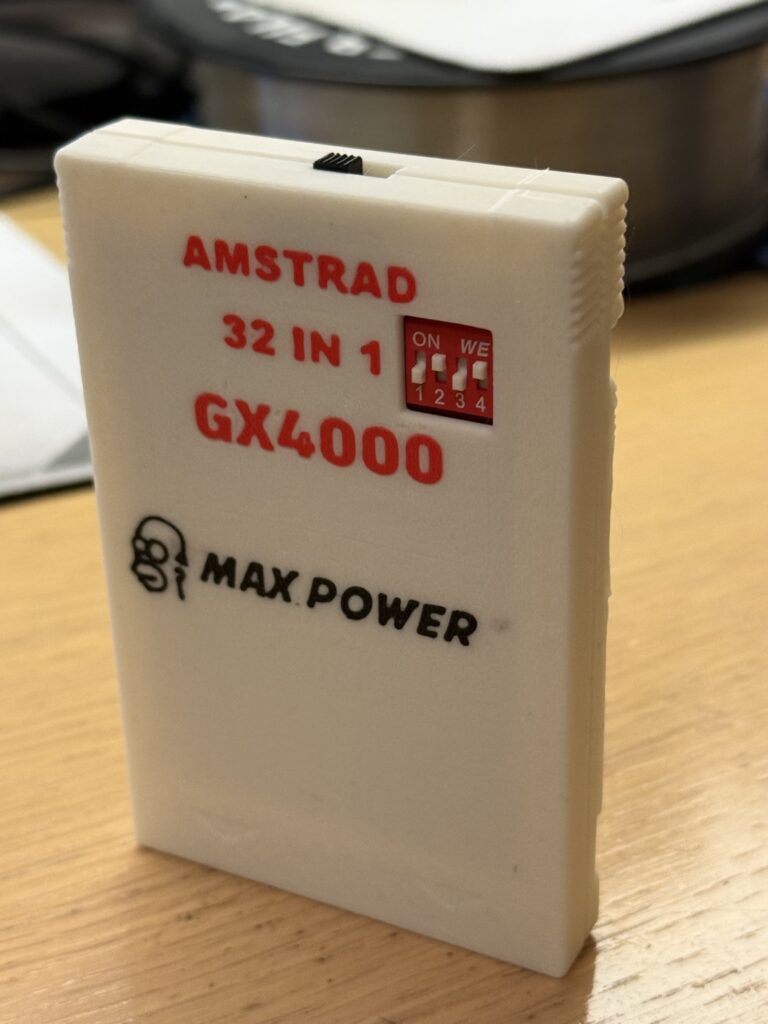
1 March 2026By popular demand, the 32-game cartridge for the GX4000 is back, but this time with through-hole components that are easy to solder and to source.
I had made the first version with through-hole components, but the EPROMs were small and could hold 8 games each, for a total of 16 games selectable with a DIP switch and a toggle switch.
The second version was more complex, a 4-layer PCB and SMD components to reduce the size and double the games. The problem here was the choice of EEPROMs, which are hard to find: they are only available on Asian marketplaces and are often counterfeit.
Several people asked me whether I had the PCB or could make the board, since the SMD version was tricky to solder and program. But since only one in 5-6 of the memory chips I had bought worked, and even those often gave problems after a while, I decided to redo the simpler and cheaper version using the larger memory chips for 8 bits.
Here is the two-layer design with the M27C160, 2MB memory chips that can work in 16-bit or 8-bit mode.
The schematic
You can also find everything on my GitHub:
https://github.com/zeus074/GX4000-THT-32Games-Multicart
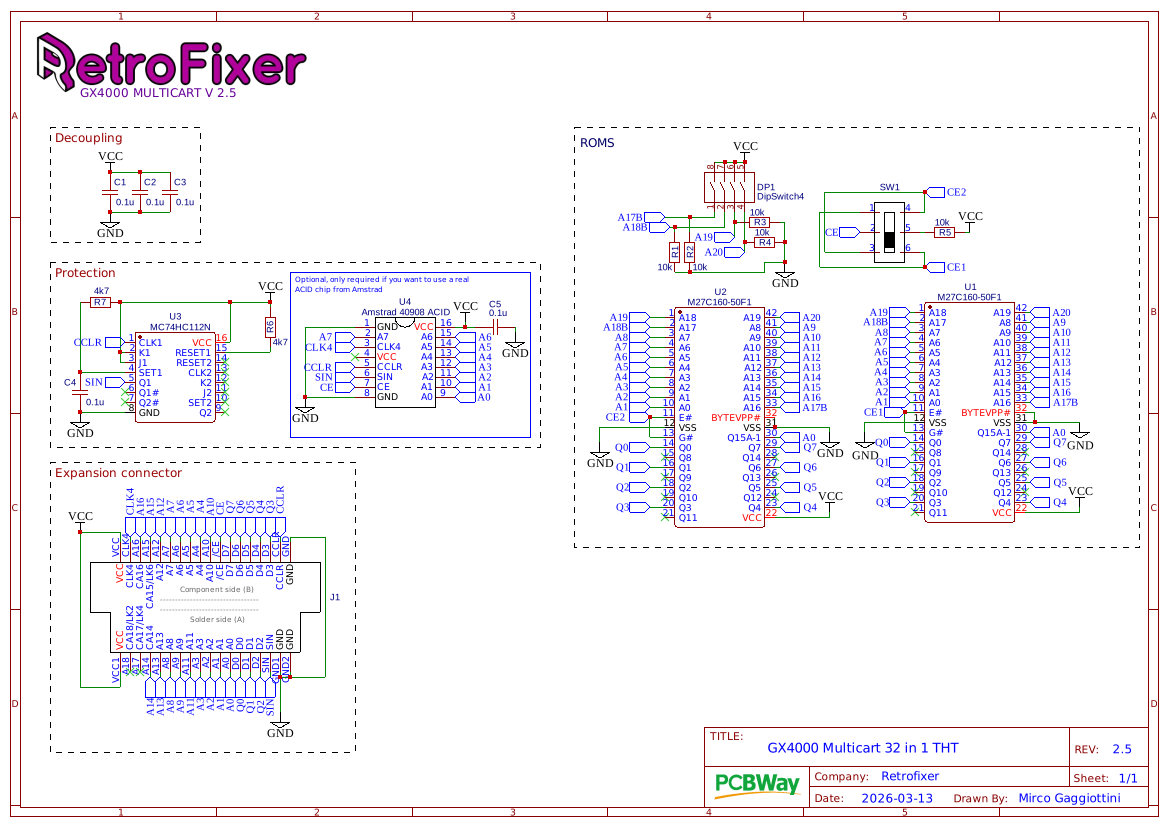
Let’s take a look at the cartridge schematic:
As you can see, it’s all fairly simple: two EPROMs selectable via a toggle switch and all the inputs/outputs on the cartridge edge connector. Compared to the previous schematics, I removed the option of addressing larger games by putting inputs A17 and A18 on the edge connector; they are now handled only by the DIP switch. Why?
Because on the first version we had to set a jumper to choose between using the DIP switch or having them handled by the console; many people didn’t do it and the cartridge didn’t work. In any case it would have been of little use, since the DIP switch handles 128K blocks and larger games couldn’t have been selected anyway.
The part for the original ACID protection was removed from the PCB, partly because some people thought they had to fit both chips, but above all it was removed to save space on the board, which is very long because of these EPROMs.
If you’re wondering why pin A0 goes to A1 and so on, it isn’t a mistake: these memory chips can work in 8 or 16-bit mode, and in 8-bit mode pin A0 is the one acting as output 15 or input 1 (which corresponds to zero), so the others shift along accordingly.
Let's board assemble the PCB
To assemble the circuit board, first solder the lowest-profile components such as resistors and, if applicable, capacitors or the 74HC112 (depending on which capacitors you have).
I recommend small capacitors, or if you can’t find them, use SMD ones: 0805 or better 1206 can be soldered on top of the pads. Ceramic disc ones, or worse still polyester ones, are too tall and would stop the 3D case from closing if you use it.
The EPROMs (obviously) must be programmed before soldering them and, given the limited space available, they must be soldered without a socket and as close to the PCB as possible. Don’t worry, because 32 games are more than enough for this console: there are fewer than 32 games of 128K and you’ll even have space left over, unless you find some homebrew, but I haven’t looked for any and don’t know whether there are any or how many.
Finally, let’s solder the switch resting on the PCB at the edge of the board and the DIP switch; if you like, you can raise the latter by 1-2mm so that it sits flush with the 3D case (again, if you use it).
Programming
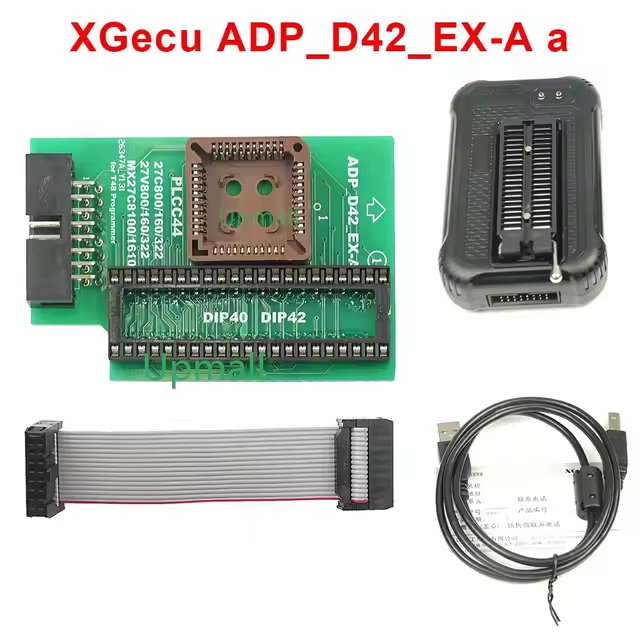
To program the EPROMs, the classic Xgecu T48 or TL866II Plus is perfectly fine. Both need an adapter to write these large memory chips, as they have as many as 42 pins against the programmer’s built-in 40-pin ZIF socket.
To put the games into the EPROM, you simply need to merge them into a single file, 16 games of 128K (the usual .bin format), and program the memory.
To make life easier, you can use the program I wrote, which merges the files into a single one ready to be written:
https://retrofixer.it/romcreator/
I used this one since I have the T48 bought on AliExpress. I won’t leave you the link because it would expire and become unreachable after a short time; better to search for it with these keywords: T48 adapter 27c160 (or dip42). For the TL866, which doesn’t have the expansion port like the T48, you need a different type of adapter, usually found with a rotary selector to choose the bank. I’ve never tried it and don’t know exactly how it works. With this one you write it all in one go.
PS: if you print the 3D case, the toggle switch must be soldered at the centre of the pins; if need be, you can rest the PCB and the switch on one part of the case and solder one pin to hold the switch in position once centred, using the 3D case as a guide.
Components
There aren’t many components needed to build it; here is the list:
R1,R2,R3,R4,R5:10K resistors
R6,R7: 4K7 resistors
C1,C2,C3,C4: 100nF capacitors
U1,U2: M27C160-50 eproms (speed doesn’t matter)
U3: 74HC112N (Flip-Flop)
DP1: Dip switch 4 way
SW1: Slide switch (like SS22f25) 2 way (ON-ON)
You can find the EPROMs both on AliExpress and on other sites, and these are usually not fake.
All resistors are 1/4W
3D houses
And here are the 3MF files to make the cartridge case.
I made two versions, a plain one without text and one with lettering to colour if you have a 3D printer that handles colours; but even if you don’t, you can print it in two colours using reverse printing.
how does reverse printing work?
load the model with the text, remove the body to be printed leaving only the text in position and print it with the desired colour; it’s a single 0.2mm layer
Change the filament and extrude to purge the old colour.
Go back in the slicer (if possible), this time removing the text and printing the rest of the case without the text (only the groove of the text remains).
If you can’t go back to review the complete object, try placing the cartridge again and see whether it positions it as before; otherwise it has to be positioned by hand in the slicer, using a good zoom to be precise.
If all is well, the second print will go around the text and the final result looks as if it had changed colour and printed the rest.
Alternatively, you can print the case with the text removed and it will be slightly recessed.
Where to get the PCB?
Well, I’ve shared the project on PCBWay and GitHub, so if you want it delivered to your home ready to solder, just click on:
To have it already in your basket, and you’ll be helping the project by allowing me to create more things like this.
Thanks to the trusty
for printing our prototype and bringing the project to life.
similar posts