

EMULATION: A FANTASTIC WORLD!
9 January 2023
ZX Spectrum +2A audio-video mod
28 January 2023EMULATION: A FANTASTIC WORLD!
9 January 2023ZX Spectrum +2A audio-video mod
28 January 2023EMULATION: A FANTASTIC WORLD!
9 January 2023ZX Spectrum +2A audio-video mod
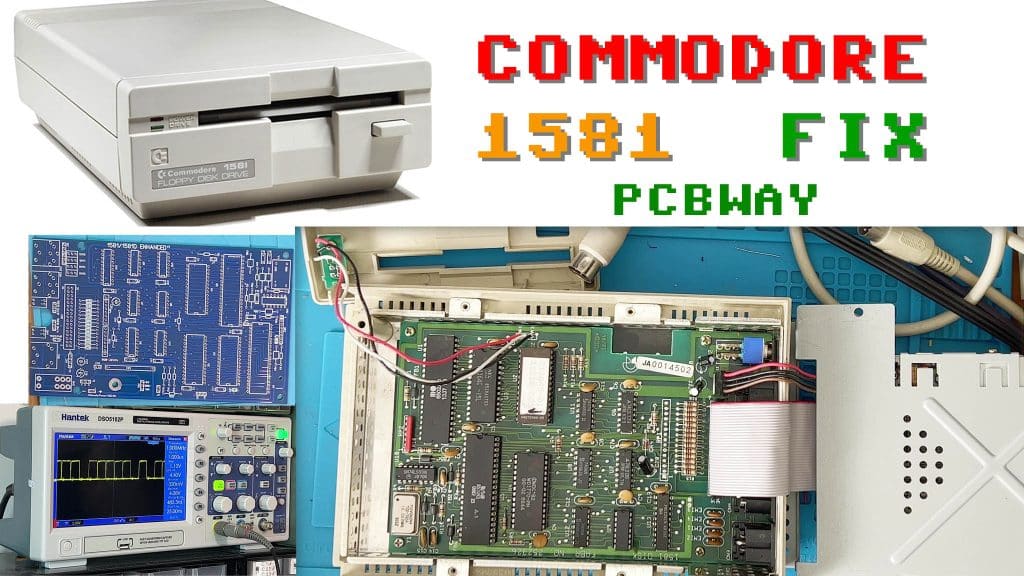
28 January 2023The first time I’ve had a 1581 in my hands! Gorgeous 🙂
First of all, let’s say what this Commodore 1581 drive is: it’s a new device designed to load and write files even faster than its predecessors (1541, 1571) and to use more common, higher-capacity floppy disks.
In fact, instead of the usual 5.25” disks, this new compact drive uses 3.5” floppies, which were widely used at the time and then increasingly so on the new IBM, Amiga, Atari etc. computers.
The drive went on sale in 1987 and was mainly intended for the C128 and C64, but it was also stated to be compatible with their predecessors.
The drive could write a good 800Kb to a floppy disk, more than double the 5.25” disks.
Now we come to the sore point of this drive: the fault is one of the most classic for these devices, the activity LED is permanently on (in other cases it might be permanently off) and the disk doesn’t spin (in other cases it might spin continuously). So far so good, I run some tests to see whether the drive responds to external commands such as reset or anything else, I connect it to a C64 and switch it on (it should reset) but the drive keeps its green LED permanently lit. I try to load the disk directory with the command load “$”,8 (check that the drive’s DIP switches are set correctly: for unit 8 both switches must be up), no result, the C64 replies: “device not present”.
From this I gather that the drive can neither drive the floppy nor interpret commands.. processor? CIA? ROM?…
I think I can already rule out (at least at this stage) the RAM and the WD1770 controller, because if it were the RAM the symptom would be a flashing LED, whereas with the controller we wouldn’t have had any floppy activity but the commands should still have given some response.
Following the manual, I check the power supplies and the main signals such as reset and clock, and I look for activity on the processor’s I/O pins. Reset and clock are OK, the address and output bus is stuck at around 3.4V.
The first thing that springs to mind is “faulty processor”; it was socketed so it only takes me a moment to swap it. Oh yes, I hadn’t told you that this drive had already been repaired, or perhaps someone had attempted to repair it. Why? Well, because there were signs of soldering, and a drive straight from the factory has no socketed components! (apart from ROM U2).

To start with, let’s take a look at Ray Carlsen’s guide
Below is an extract of the part we’re interested in.
One drive problem shows up as a continuous green activity light (the LED doesn't go out two seconds after power up) and there is no drive access. Most of the time, it's the DOS ROM chip U2 (CBM 318045-01) that's bad. That chip can be a ROM or an EPROM and normally is the only socketed chip in the drive, unless someone has added other sockets during repairs or upgrades. Other chips that can produce that symptom are a bad VIA chip U5, a CBM 8520, (also used in the Amiga) or U9, a 74LS14 (a standard TTL IC). Note that if the drive doesn't complete its initialization sequence at powerup or reset (for whatever reason), two of the serial lines (pins 4 and 5 of the DIN connectors) will remain logic low instead of going high as they should. Another thing that concerns some 1581 owners is the WD1770 vs WD1772 U4 drive controller IC dilemma. Some early drives failed because of a bad batch of 1770 disk controller ICs from the factory.
Ray Carlsen CET
Among the possible suspects, the ROM is at the top of the list, and since it’s socketed from the factory we can test it effortlessly.
Test passed, the ROM is good.
Moving on, the second possible cause could be U5, the VIA, an 8520 used as a CIA on the Amiga 500.
Right, let’s test that too. The VIA is OK.
It could be U9, the 74LS14, but it’s good; suspicion also falls on the WD1770, but that’s good too..
There’s no mention of the CPU, but I swap it anyway, though the result doesn’t change.
If you look at the PCB, all these components are socketed; whoever worked on it must have read the guide 😀
I have a look at the solder joints etc. and notice that under U9 there are 2 traces that don’t look great and a bulge in the PCB near some pins. I remove the socket and find that 2 traces have been redone: probably, while trying to remove the IC, someone overheated it and damaged 2 traces and a pad, which was missing completely. The pad wasn’t essential because it had only lifted on the top side and wasn’t connected to anything there; the one underneath was fine. Still, a nasty business: usually when this kind of work has been done you can no longer take anything for granted, they might have done the same thing on other sockets.
I remove the other sockets to check that the traces underneath are all intact, and they seem to be.
I carry on testing and try removing the chips that aren’t strictly necessary for the processor to run (not the drive), to understand why there’s no activity at all even though the replacement CPU is good and the signals don’t indicate the processor has halted. In the end I find that with the VIA removed the processor starts communicating and you can see signals on the bus; obviously the drive doesn’t work without the VIA and everything is stuck as before. The VIA is good, and I swap it both with one from an A500 and with one from another 1581, but with no result: as soon as I insert the 8520 the processor stops and the bus stays at 3.4V.
I leave one address pin of the VIA and of the CPU out of the socket to see which of the two is holding the bus high.. well, neither of them!
It’s the ROM that should be holding the bus high; oh, I forgot, I also removed the RAM for these tests. True, the ROM has its CS low, so it’s reading the address bus and writing to its outputs.. but all high? And the addresses too? There’s something I’m still missing. I also test the logic gates, all good.. I check the diode and a couple of resistors and resistor networks to make sure it can’t be a problem with some particular load.. All OK, but nothing works.
I check the traces and verify that the inputs/outputs go to the VIA, CPU, RAM, ROM.. and here too everything is OK.
“Despair”. And now what?
After all these tests I’ve verified that all the components work, so there must be a problem on the board that, after all these tests, I haven’t managed to find. In the end I decide to replace the PCB with a new-generation one, which you can find at this link:
https://www.pcbway.com/project/shareproject/Commodore_1581_Enhanced_Drive_Board_fcc9554b.html
I start removing the old components, connectors, ferrites etc.. to fit them on the new one.


Not yet! With the new board the LED-steady-on problem remains, so the first thing I do is swap the processor (since I’d put the original one back) and with the second one the LED went out!!!
OK, that processor may well have been faulty, but on the old board I’d tried a good 3 of them, all with the same result.
I reconnect everything, including the floppy mechanism, and test it with my C64 test mule; well, I’ll skip the part where it wouldn’t communicate because the 64’s CIA was faulty. At last I test the drive and manage to read the directory and load a program.
HOORAY!
After days and days on this board, you can’t imagine the satisfaction I felt when it read the directory, it was as if I had built that drive myself 🙂
Moral of the story: be careful, because sometimes you can do more damage to a board than repair, and then finding the fault, which may be on top of something else, becomes a maze.
If you want to watch the video of this exhausting repair, below you’ll find the 2 episodes of its FIX!
As I always say, subscribe to the channel, it’s free and it allows us to bring you more content.
And if you’d like to support us, you can do so by sending a thank you or a heart under the YouTube video, or by making a donation; you’ll find the link at the top in the menu.

similar posts
| Cookie | Durata | Descrizione |
|---|---|---|
| cookielawinfo-checkbox-analytics | 11 months | This cookie is set by GDPR Cookie Consent plugin. The cookie is used to store the user consent for the cookies in the category "Analytics". |
| cookielawinfo-checkbox-functional | 11 months | The cookie is set by GDPR cookie consent to record the user consent for the cookies in the category "Functional". |
| cookielawinfo-checkbox-necessary | 11 months | This cookie is set by GDPR Cookie Consent plugin. The cookies is used to store the user consent for the cookies in the category "Necessary". |
| cookielawinfo-checkbox-others | 11 months | This cookie is set by GDPR Cookie Consent plugin. The cookie is used to store the user consent for the cookies in the category "Other. |
| cookielawinfo-checkbox-performance | 11 months | This cookie is set by GDPR Cookie Consent plugin. The cookie is used to store the user consent for the cookies in the category "Performance". |
| viewed_cookie_policy | 11 months | The cookie is set by the GDPR Cookie Consent plugin and is used to store whether or not user has consented to the use of cookies. It does not store any personal data. |